
As I mentioned in my last post, I no longer work for a boss, just my self. I branched out as a freelance personal assistant and have contracted with a company to supply me with clients on a daily basis. This wonderful company is a Texas based company out of Austin called Favor, now in over 100 cities in Texas. I pick up food and deliver it, I go shopping for people, and I can deliver just about anything in under an hour. In fact, that is the company's tag line "Anything - Delivered!". This adventure in personal assisting has provided some unique experiences, both bad (very few) and good (a lot), then there are those exceptional moments that happen along quite often that makes your day or your week.
As it so happens, the NFL Playoffs are in full swing and my Dallas Cowboys are in the thick of the battle for the crown. Last Saturday, Favor and Football collided with Romance and a stroke of luck to make it a very special day indeed. It was the first day of the playoff with the Cowboys set to take on the Seahawks at Jerry World in the prime time game. I had my Favor shirt on over a Cowboys t-shirt, had my Cowboys jacket and ball cap on and was in full game day mode. I had scheduled myself from 9 to 4 (a perk of working for me!) so as not to miss a moment of the game.
So I am tooling around the trendy restaurants near down town when I get a Favor for one smoothie picking up in SW Ft Worth delivering to Mira Vista. Mira Vista is a walled Country Club Community for the Nouveau riche that is so exclusive a mere dog house behind one of the baronial homes there would run close to a million dollars. Understandably, I was not thrilled with the prospect of a low dollar long distance run, however, I try not to turn down things so off I went.
As I was traveling to pick up the smoothie, the client texts me and said he needed a Favor and sent a screen shot of what he wanted. Now my car answers text messages for me but does not display any photo or screen shot. Now I Run Favors so I said OK without really knowing what he wanted. I got to a pull over point and was going to text him a query about the Favor when I saw the screen shot. Here are his instructions:
"Ask for (wife) and tell her 'She is a finalist in the Cowboys Playoff Roundup. All you have to do is answer one questions correctly... Who is the most awesomest husband ever?...(her husband of course!) YOU HAVE JUST WON A TICKET TO THE GAME TONIGHT WITH (BEST FRIEND). THE CAR SERVICE WILL PICK YOU UP AT 5. Your husband loves you!'"
Now as you all know I am a hopeless romantic and a die hard Cowboys fan, how could I say no to such a romantic thing to do for his wife. So of course now I was on a mission to facilitate romance for a couple of Cowboy fans. I took of my Favor Shirt so I was all decked out in Cowboy gear and did exactly as instructed. The husband answered the door and called his wife to the door. She was suitably surprised and I am sure he was well rewarded for his romanticism, especially given the Cowboys victory in a stellar performance by all involved. He was behind his wife recording the whole thing on his cell phone and he tipped me $20 for pulling it off so well which of course made me very happy as well.
Now here is where the stroke of luck comes in to play. I have not had my hair cut in some time because my stylist left the salon where I had been going and I hadn't bothered to find another. As I was walking up to the smoothie place, my stylist comes running out the door of the salon next door and wraps me in a big hug and we visited a bit. I grabbed her number so I can get my hair cut and then went on to facilitate romance on a grand scale. It did not matter what happened the rest of the day, I had had a ball making Cowboys Playoff Football Romantic for some true fans, and I was happy as a pig in a poke.
As it so happens, the NFL Playoffs are in full swing and my Dallas Cowboys are in the thick of the battle for the crown. Last Saturday, Favor and Football collided with Romance and a stroke of luck to make it a very special day indeed. It was the first day of the playoff with the Cowboys set to take on the Seahawks at Jerry World in the prime time game. I had my Favor shirt on over a Cowboys t-shirt, had my Cowboys jacket and ball cap on and was in full game day mode. I had scheduled myself from 9 to 4 (a perk of working for me!) so as not to miss a moment of the game.
So I am tooling around the trendy restaurants near down town when I get a Favor for one smoothie picking up in SW Ft Worth delivering to Mira Vista. Mira Vista is a walled Country Club Community for the Nouveau riche that is so exclusive a mere dog house behind one of the baronial homes there would run close to a million dollars. Understandably, I was not thrilled with the prospect of a low dollar long distance run, however, I try not to turn down things so off I went.
As I was traveling to pick up the smoothie, the client texts me and said he needed a Favor and sent a screen shot of what he wanted. Now my car answers text messages for me but does not display any photo or screen shot. Now I Run Favors so I said OK without really knowing what he wanted. I got to a pull over point and was going to text him a query about the Favor when I saw the screen shot. Here are his instructions:
"Ask for (wife) and tell her 'She is a finalist in the Cowboys Playoff Roundup. All you have to do is answer one questions correctly... Who is the most awesomest husband ever?...(her husband of course!) YOU HAVE JUST WON A TICKET TO THE GAME TONIGHT WITH (BEST FRIEND). THE CAR SERVICE WILL PICK YOU UP AT 5. Your husband loves you!'"
Now as you all know I am a hopeless romantic and a die hard Cowboys fan, how could I say no to such a romantic thing to do for his wife. So of course now I was on a mission to facilitate romance for a couple of Cowboy fans. I took of my Favor Shirt so I was all decked out in Cowboy gear and did exactly as instructed. The husband answered the door and called his wife to the door. She was suitably surprised and I am sure he was well rewarded for his romanticism, especially given the Cowboys victory in a stellar performance by all involved. He was behind his wife recording the whole thing on his cell phone and he tipped me $20 for pulling it off so well which of course made me very happy as well.
Now here is where the stroke of luck comes in to play. I have not had my hair cut in some time because my stylist left the salon where I had been going and I hadn't bothered to find another. As I was walking up to the smoothie place, my stylist comes running out the door of the salon next door and wraps me in a big hug and we visited a bit. I grabbed her number so I can get my hair cut and then went on to facilitate romance on a grand scale. It did not matter what happened the rest of the day, I had had a ball making Cowboys Playoff Football Romantic for some true fans, and I was happy as a pig in a poke.
================================================================
For your listening pleasure today, I have a real treat in store for you all from someone who is among the most revered virtuosos of all time. Nicolò Paganini was a true
musical legend of his era, inspiring musicians such as Robert Schumann
to forge his own career as a pianist. Franz Schubert was also a regular
audience member at Paganini’s concerts, despite the outlandish ticket
prices.
Paganini often remarked that, despite his legendary status as a violinist, he found it rather difficult to compose for the instrument. This release presents Paganini's complete violin concertos, performed by violinist Alexandre Dubach accompanied by the Orchestre Philharmonique de Monte-Carlo. This recording features two conductors, Lawrence Foster and Michel Sasson. The complete play list is under the video.
Paganini often remarked that, despite his legendary status as a violinist, he found it rather difficult to compose for the instrument. This release presents Paganini's complete violin concertos, performed by violinist Alexandre Dubach accompanied by the Orchestre Philharmonique de Monte-Carlo. This recording features two conductors, Lawrence Foster and Michel Sasson. The complete play list is under the video.
00:00:00 Violin Concerto No. 4 in D Minor: I. Allegro maestoso
00:16:44 Violin Concerto No. 4 in D Minor: II. Adagio flebile con sentimento
00:23:25 Violin Concerto No. 4 in D Minor: III. Rondo galante. Andantino gaio
00:34:10 Violin Concerto No. 1 in D Major, Op. 6: I. Allegro maestoso
00:54:15 Violin Concerto No. 1 in D Major, Op. 6: II. Adagio espressivo
00:59:28 Violin Concerto No. 1 in D Major, Op. 6: III. Rondo: allegro spirituoso
01:09:08 Violin Concerto No. 3 in E Major: I. Introduzione. Andantino - Allegro marziale
01:26:57 Violin Concerto No. 3 in E Major: II. Adagio. Cantabile spianato
01:34:13 Violin Concerto No. 3 in E Major: III. Polacca. Andantino vivace
01:46:22 Violin Concerto No. 6 in E Minor: I. Risoluto
02:07:04 Violin Concerto No. 6 in E Minor: II. Adagio
02:13:59 Violin Concerto No. 6 in E Minor: III. Rondo ossia polonese
02:25:27 Violin Concerto No. 5 in A Minor: I. Allegro maestoso
02:44:27 Violin Concerto No. 5 in A Minor: II. Andante un poco sostenuto
02:53:03 Violin Concerto No. 5 in A Minor: III. Rondo
03:03:37 Violin Concerto No. 2 in B Minor, Op. 7: I. Allegro maestoso
03:19:05 Violin Concerto No. 2 in B Minor, Op. 7: II. Adagio
03:26:05 Violin Concerto No. 2 in B Minor, Op. 7: III. Ronde à la clochette
00:16:44 Violin Concerto No. 4 in D Minor: II. Adagio flebile con sentimento
00:23:25 Violin Concerto No. 4 in D Minor: III. Rondo galante. Andantino gaio
00:34:10 Violin Concerto No. 1 in D Major, Op. 6: I. Allegro maestoso
00:54:15 Violin Concerto No. 1 in D Major, Op. 6: II. Adagio espressivo
00:59:28 Violin Concerto No. 1 in D Major, Op. 6: III. Rondo: allegro spirituoso
01:09:08 Violin Concerto No. 3 in E Major: I. Introduzione. Andantino - Allegro marziale
01:26:57 Violin Concerto No. 3 in E Major: II. Adagio. Cantabile spianato
01:34:13 Violin Concerto No. 3 in E Major: III. Polacca. Andantino vivace
01:46:22 Violin Concerto No. 6 in E Minor: I. Risoluto
02:07:04 Violin Concerto No. 6 in E Minor: II. Adagio
02:13:59 Violin Concerto No. 6 in E Minor: III. Rondo ossia polonese
02:25:27 Violin Concerto No. 5 in A Minor: I. Allegro maestoso
02:44:27 Violin Concerto No. 5 in A Minor: II. Andante un poco sostenuto
02:53:03 Violin Concerto No. 5 in A Minor: III. Rondo
03:03:37 Violin Concerto No. 2 in B Minor, Op. 7: I. Allegro maestoso
03:19:05 Violin Concerto No. 2 in B Minor, Op. 7: II. Adagio
03:26:05 Violin Concerto No. 2 in B Minor, Op. 7: III. Ronde à la clochette
================================================================
Finally for today. I am still discovering various neat little things about the newest version of Windows 10. One of the neatest is contained within the Photos App native to the OS. It takes your photos and create little albums with titles like Days in Tekapo or Trip to Rodrigues, or simply a date. You have the options to keep or remove the albums, and I usually keep them. The app culled through my more than 150,000 images on my computer and so far created 9 albums for me. A prime example is the album posted below which is titled Friday July 1, 2016. I think you will find these men all stunningly attractive, each in their own special way. Peruse them at you leisure. I will share more of these albums as we go along on the journey that is Nichevo. Thanks for stopping in, do call again and as always, Enjoy!


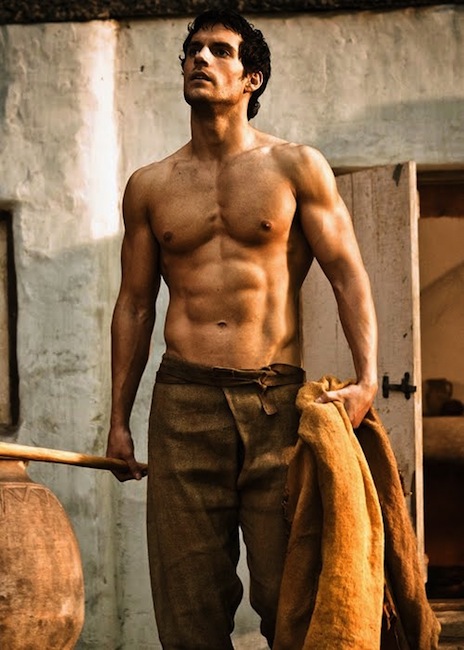


Finally for today. I am still discovering various neat little things about the newest version of Windows 10. One of the neatest is contained within the Photos App native to the OS. It takes your photos and create little albums with titles like Days in Tekapo or Trip to Rodrigues, or simply a date. You have the options to keep or remove the albums, and I usually keep them. The app culled through my more than 150,000 images on my computer and so far created 9 albums for me. A prime example is the album posted below which is titled Friday July 1, 2016. I think you will find these men all stunningly attractive, each in their own special way. Peruse them at you leisure. I will share more of these albums as we go along on the journey that is Nichevo. Thanks for stopping in, do call again and as always, Enjoy!


